GCS Foxglove Visualization
The GCS runs a Foxglove Studio interface backed by a single ROS 2 node — foxglove_visualizer_node — that gathers per-robot data from the cross-domain bridge and republishes it on a small set of GCS-side topics. Foxglove subscribes to those topics and shows the fleet in 3D.
This page describes what the node visualizes today and the topic naming convention. To change or add a marker type, see Extending the Foxglove Visualizer. For the gossip payload visualization (filtered rays, voxel maps, etc.) see Coordination Payloads.
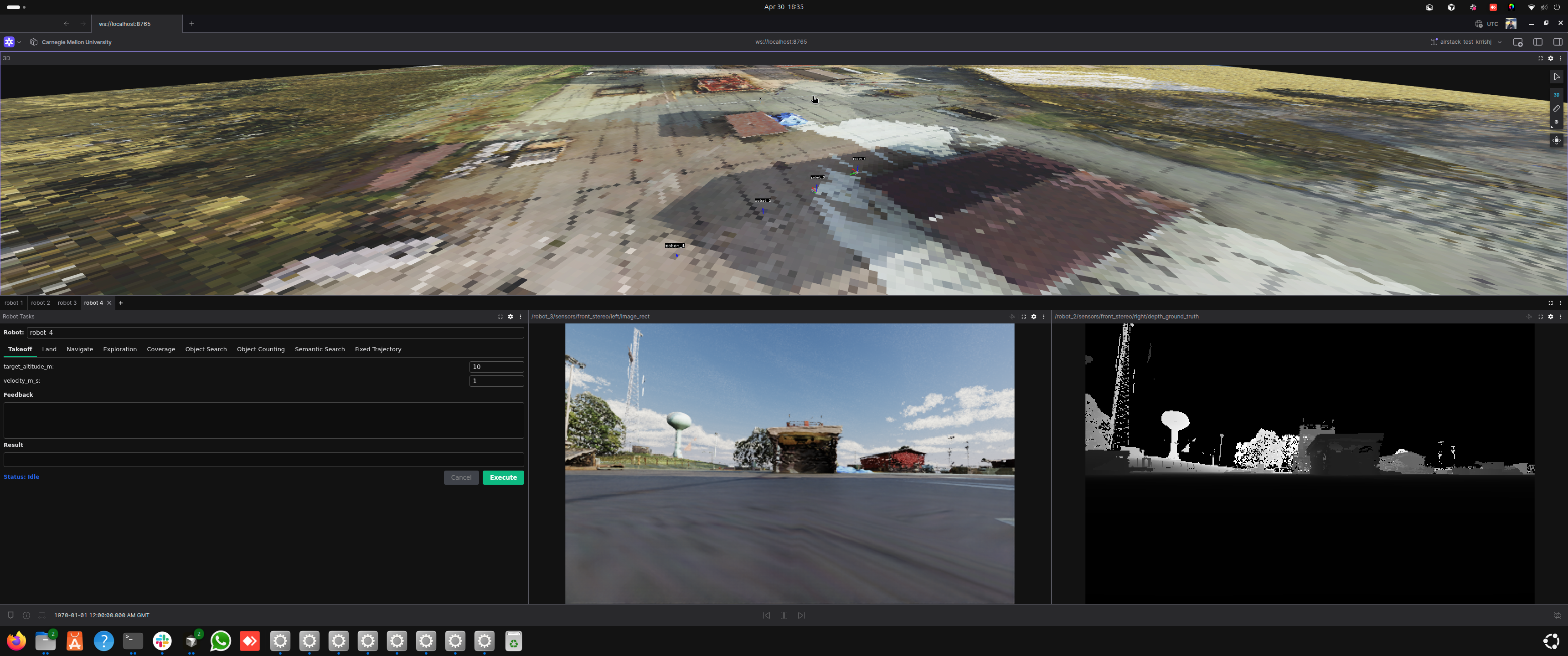
Foxglove during a live 3-robot Isaac Sim run: the 3D panel draws each drone's trajectory (Circle / Figure-8 FixedTrajectoryTask patterns) while the per-robot tabs show Robot Tasks and live camera + depth feeds.
Connecting to Foxglove and loading the custom layout
The NUM_ROBOTS-matched layout loads automatically — no manual import. On every GCS container startup, gcs/foxglove_extensions/render_layout.py renders an <N>-robot layout from the single-robot template (gcs/foxglove_extensions/airstack_default.json) and seeds it straight into the Foxglove desktop app's local layout store (/root/.config/Foxglove/studio-datastores/layouts-local/airstack_default_<N>_robots — bind-mounted from gcs/docker/Foxglove, so it persists across container restarts). gcs.launch.xml then opens Foxglove with a deep link that both connects to ws://localhost:8765 and selects that layout by id, so the app comes up showing AirStack default (<N> robots) immediately.
Editing and saving the layout
The seeded layout is an ordinary local layout — edit it and use Save as usual. Your saved edits are preserved: the seeder detects that the layout no longer matches what it generated and will not overwrite it on later startups (this also means template updates stop propagating to an edited layout). Two ways to manage this:
- Reset to the generated default: delete the layout in Foxglove's Layouts menu — the next container start re-seeds a fresh copy.
- Keep your own variant safe forever: Save As a personal copy under a different name; the seeder never touches layouts it didn't create.
Manual fallback
The rendered layout is also still written to /root/airstack_layout_num_robots_<N>.json inside the container, so Layouts → Import from file... keeps working — useful when running Foxglove on the host instead of in the container (connect to ws://localhost:8766 in that case).
Foxglove version pin
Dockerfile.gcs pins the Foxglove desktop version (FOXGLOVE_VERSION build arg) because the auto-load mechanism writes the app's on-disk local-layout record format directly. Before bumping the pin, verify the format in the new version's studio-datastores/layouts-local/ still matches what render_layout.py::seed_layout_store writes.
Robot naming assumption
Layout rendering assumes robots are named robot_1..robot_N (the default robot-name map). Fleets with custom robot names (RFC #380) still get the default-named tabs; name-aware rendering is future work.
What gets visualized
The visualizer auto-discovers any robot whose topics match the AirStack convention (default prefix: robot). For each discovered robot it subscribes to a fixed set of suffixes:
| Suffix | Type | What it becomes on the GCS |
|---|---|---|
/interface/mavros/global_position/global |
NavSatFix |
Robot location pin on the Map panel |
/odometry_conversion/odometry |
Odometry |
Body-frame pose / orientation arrow |
/trajectory_controller/trajectory_vis |
MarkerArray |
Live executing trajectory |
/global_plan |
Path |
Global plan polyline |
/vdb_mapping/vdb_map_visualization |
Marker |
Per-robot VDB occupancy mesh |
All of these are published by individual robots in their local map frame (origin = drone boot position). The visualizer translates them into a single global map frame on the GCS using each robot's GPS boot offset, and merges everything into one MarkerArray.
Output topics
| Topic | Type | What it carries |
|---|---|---|
/gcs/robot_markers |
MarkerArray |
Combined per-robot markers (mesh, trajectory, plan, VDB) in global ENU |
/gcs/{robot_name}/location |
NavSatFix |
Per-robot GPS rewritten to frame_id='map' — Foxglove's Map panel only accepts it that way |
/gcs/map_origin/location |
NavSatFix |
Stationary fix at the configured ORIGIN_LAT/LON so the Map panel has a fixed reference |
/gcs/sim_ground |
Marker |
Sim overhead-camera output rendered as a textured ground plane (sim only) |
/gcs/payload/{robot}/{name} |
varies | Per-robot gossip-payload republish (one topic per registered handler) |
Discovery loop
_discover_robots runs every 5 seconds. It calls get_topic_names_and_types(), regex-matches each suffix above, and creates a subscription if it sees a topic it doesn't already track. Robots that come online late are picked up on the next tick.
To change which prefix is matched (e.g. you renamed robots from robot_* to drone_*), set the robot_name_prefix parameter on the visualizer node.
Sim-only: textured overhead ground
When running in sim, the visualizer also subscribes to /sim/overhead/image + /sim/overhead/spec. On receiving both, it builds one TRIANGLE_LIST marker on /gcs/sim_ground (latched) and tears down its subscriptions. See 2D World Map in Foxglove for the producer side.
Troubleshooting
| Symptom | Likely cause |
|---|---|
| Robot doesn't appear at all | Source topic isn't in the DDS router allowlist, or the GPS topic isn't publishing yet |
| Robot appears at the wrong global location | First GPS fix had wrong altitude datum, or PX4 home wasn't set (sim) |
| Markers double-offset (visibly twice as far from where they should be) | Both pose.position and points[] were offset in the render loop |
| New marker added but never shows up | Discovery hasn't fired yet (5 s interval), or topic name doesn't match the regex |
Foxglove "frame map does not exist" |
The static world → map TF didn't reach Foxglove — restart the GCS container |
See also
- Extending the Foxglove Visualizer — maintainer guide: modifying or adding marker types, bridging topics
- Coordination Payloads — extending visualization with gossip-broadcast payloads
- Adding Waypoints and Geofences — interactive click-to-place editors
- Overhead Camera — sim-side ground texture producer