Aerial Robot Simulation via the Pegasus Extension
Pegasus Simulator is a multirotor simulation and control framework built on top of NVIDIA Isaac Sim’s physics engine. Isaac Sim provides the underlying physics and rendering and Pegasus Simulator implements the drone flight dynamics, control algorithms, and PX4 integration.
Pegasus Sim accurately models multirotor dynamics and environment interaction, providing a physically grounded foundation for UAV simulation. Pegasus connects directly to the AirStack autonomy stack with its PX4 MAVLink integration, allowing AirStack’s higher-level planning and perception components to control a realistically simulated drone as if it were a physical vehicle.
Custom Pegasus Node in AirStack
By default, Pegasus Simulator only supports Isaac's standalone python workflow. This means your scene cannot be edited and saved through the GUI.
To make things more GUI-friendly for the user, AirStack maintains a fork of Pegasus Simulator that enables Pegasus's features from an Omnigraph node. This node serves as an Isaac Sim OmniGraph action graph wrapper around the Pegasus Sim code which can then be saved in Universal Scene Description (USD) format which are easily readable in Isaac-Sim. This design allows Pegasus-based simulations to be defined entirely in USD, enabling scenario reusability and modular composition. Users can drop the same Pegasus node into different environments or swap robots while maintaining consistent physics and control behavior.
Through this approach, AirStack leverages Pegasus to create a flexible, reusable, and realistic simulation framework for aerial robotics research and development.
Launch Configuration
At the top level of the AirStack simulation environment, a .env file controls how Pegasus and Isaac Sim are launched:
ISAAC_SIM_GUI="/isaac-sim/AirStack/simulation/isaac-sim/assets/scenes/simple_pegasus.scene.usd"
# Set to "true" to launch Isaac Sim using a standalone Python script instead of a USD file
ISAAC_SIM_USE_STANDALONE="true"  # "true" or "false"
# Script name (must be in /AirStack/simulation/isaac-sim/launch_scripts/)
ISAAC_SIM_SCRIPT_NAME="example_one_px4_pegasus_launch_script.py"
PLAY_SIM_ON_START="true"  # honored in both modes; `airstack up --no-play` overrides
There are two modes for launching Pegasus simulations:
- Load an existing USD file (e.g. *.pegasus.robot.usd) — to simulate a prebuilt robot/environment setup.
- Use a standalone Python script — to dynamically generate a USD and configure the world from scratch.
This is toggled by the ISAAC_SIM_USE_STANDALONE variable in the .env file. If set to false, the file specified by ISAAC_SIM_GUI is loaded directly. If set to true, the script named in ISAAC_SIM_SCRIPT_NAME is executed to generate the scene. It is generally recommended to use the scripted approach to generate new scenes (or at least the pegasus drone) since it handles a lot of the OmniGraph and sensor configurations automatically, then saving it, for future reuse and setting ISAAC_SIM_USE_STANDALONE to false afterwards with ISAAC_SIM_GUI pointing to your saved file.
Scripted Scene Generation
Python scripts give full programmatic control over every aspect of scene construction at startup, making them especially useful for:
- Reproducible scenarios — the entire scene is defined in code, not a saved USD file.
- Nucleus asset integration — loading
omniverse://assets that need unit conversion or collision baking before use. - Multi-robot setups — dynamically spawning N drones with distinct IDs and positions.
- CI / headless testing — running without a GUI.
Example scripts are provided in simulation/isaac-sim/launch_scripts/. They are all thin subclasses of the shared pegasus_app.PegasusApp base class, which owns the boilerplate (SimulationApp creation, extension enabling, world/environment loading, stage prep, drone + sensor spawning, run loop) — see Spawning Drones for how to write one.
Scene Preparation Utilities
Location: simulation/isaac-sim/utils/scene_prep.py
scene_prep.py provides helpers that are shared across all example launch scripts — scaling, colliders, dome lighting, self-contained saving, and stage-unit conversion. The full per-function reference lives in Spawning Drones → Scene prep helpers.
Loading scene_prep
scene_prep.py lives in utils/, which is not on sys.path by default. The example scripts add it at runtime before importing:
import sys
import os

sys.path.insert(0, os.path.normpath(os.path.join(os.path.dirname(os.path.abspath(__file__)), "..", "utils")))
import scene_prep
from scene_prep import scale_stage_prim, add_colliders, add_dome_light, save_scene_as_contained_usd
Running a Standalone Script
Set the following variables in the top-level .env file and then launch as normal:
Scripts must live in simulation/isaac-sim/launch_scripts/. Set ISAAC_SIM_SCRIPT_NAME to the filename only (no path).
Common Pitfalls
| Symptom | Cause | Fix |
|---|---|---|
| Drone falls through the floor immediately | add_colliders was not called |
Call add_colliders(stage_prim) after loading the environment |
| Colliders applied to wrong-scale geometry | add_colliders called before scale_stage_prim |
Always call scale_stage_prim first, then add_colliders |
| Physics behaves erratically after colliders added | Update frames not pumped after add_colliders |
Pump at least 10 omni.kit.app.get_app().update() calls after add_colliders |
ImportError: No module named 'omni' at script top |
omni imported before SimulationApp() |
Move all omni.* imports to after the SimulationApp(...) line |
scene_prep not found / ModuleNotFoundError |
utils/ not on sys.path in Isaac Sim's Python |
Use sys.path.insert to add the utils/ directory before importing scene_prep |
| Drone spawns at wrong height in cm-scale scene | Spawn coordinates not converted to stage space | Multiply metric init_pos values by scene_scale from get_stage_meters_per_unit |
RTX OmniLidar and near range (min_range) — known limitation
AirStack’s Pegasus fork (Isaac Sim 5.1+) wires RTX OmniLidar through OmniGraph helpers such as add_rtx_lidar_subgraph in pegasus.simulator.ogn.api.spawn_rtx_lidar (used from simulation/isaac-sim/launch_scripts/example_one_px4_pegasus_launch_script.py, example_multi_px4_pegasus_launch_script.py, etc.). The lidar publishes the raw cloud on …/sensors/ouster/point_cloud_raw; consumers read the filtered topic …/sensors/ouster/point_cloud.
min_range → nearRangeM in simulation
The spawn code maps the Python argument min_range to the OmniLidar prim attribute omni:sensor:Core:nearRangeM when it exists, and logs a warning when it does not. The module docstring in spawn_rtx_lidar.py states the reality: some Kit builds only express echo spacing in the vendor lidar JSON profile, not as a writable Core prim attribute, so setting near range in Isaac does not consistently remove short-range returns.
Known bug / policy: Do not rely on Isaac-only min_range / nearRangeM as your primary near-field cleanup. Use the robot-side package lidar_point_cloud_filter (see Sensors — LiDAR filter), which applies a configurable near_range_m sphere filter in the ROS graph and publishes a stable cloud for VDB, exploration, and RViz.
Known bugs and workarounds for Scripted Scene Generation
-
Stage Offset Bug
In some cases, the saved USD file may contain an offset in the stage transform. -
After launching the stage, manually set all position offsets to zero in the Property panel of Isaac Sim.
-
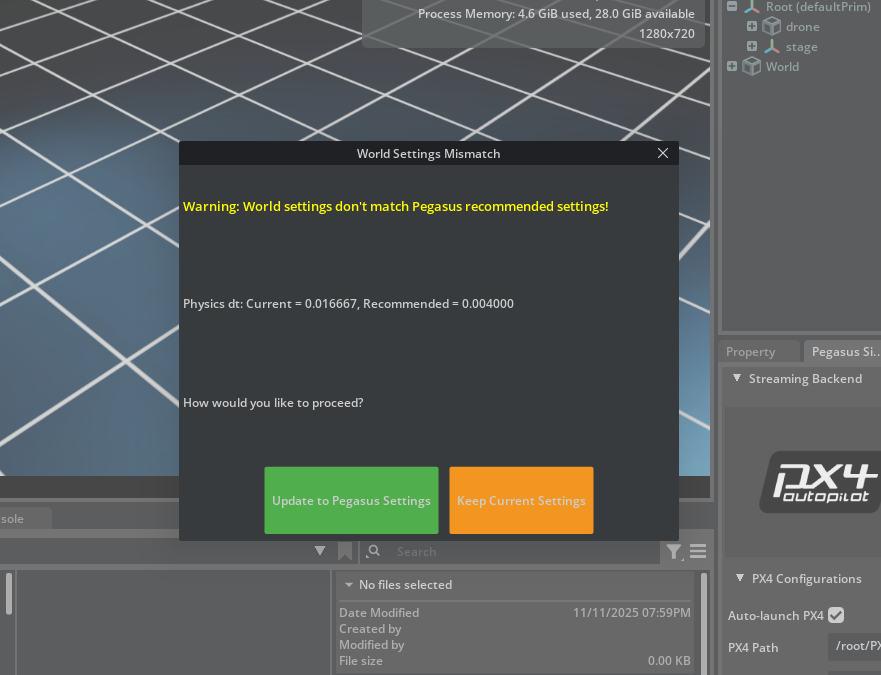
Pegasus Physics Update Prompt
When reloading a saved stage, Isaac Sim may display a popup asking to update to new Pegasus Physics. -
Accept the update to ensure compatibility with the new Pegasus physics scene.
-
Stereo Camera Initialization
Occasionally, the right camera in a stereo camera pair may fail to initialize. -
When starting the sim, press Start → Stop → Start again in the Isaac Sim toolbar.
-
This will refresh the right camera node and restore proper stereo output.
-
Pegasus Node Not Recognized (Drone Not Arming/Taking Off) The drone not arming/taking off can be a symptom of the PX4Multirotor Node not being recognized in omnigraph. This may be due the
pegasus.simulatorextension not being loaded. -
To fix, launch the simulator with
airstack up isaac-sim, in the toolbar, click Window -> Extensions -> Third Party, serach for "pegasus", select the "PEGASUS SIMULATOR" and enable "AUTOLOAD" - Restart your docker container by running
airstack down isaac-sim && airstack up isaac-simand the extension should load every time now.
Physics Rate and IMU_INTEG_RATE
The Isaac Sim physics step rate is the dominant factor in simulation performance. Pegasus defaults to 250 Hz, which runs well below real-time when a full sensor suite is active. AirStack lowers this to 100 Hz by reducing PX4's IMU_INTEG_RATE to match — since IMU_INTEG_RATE controls how often Isaac Sim steps the physics world in lockstep with PX4. 100 Hz is the minimum viable rate: PX4's EKF2 estimator has a fixed 10 ms update period, so IMU_INTEG_RATE must be at least 100 Hz or the state estimator falls behind sensor data.
Configuration
Two variables in the top-level .env control the rates:
# Pegasus physics/rendering rates (read by params.py; PX4_IMU_INTEG_RATE synced automatically).
# Minimum frequency supported by PX4 is 100 Hz.
PX4_PHYSICS_HZ="100"
PX4_RENDERING_HZ="30"
PX4_PHYSICS_HZ— Setsphysics_dt = 1 / PX4_PHYSICS_HZin Isaac Sim's physics scene, and automatically syncs PX4'sIMU_INTEG_RATEparameter to the same value viaPX4LaunchTool→px4-rc.simulator. Patched within the Docker image to read the environment variable and set the IMU_INTEG_RATE parameter.PX4_RENDERING_HZ— Sets the rendering frame rate independently of physics. 30 Hz rendering has no effect on physics accuracy or PX4 behavior, but does slightly affect performance due to resource usage.
Valid values
PX4's documented presets for IMU_INTEG_RATE are 100, 200, 250, 400 Hz. The minimum is 100 Hz — the EKF2 estimator runs at 100 Hz (10 ms period) and IMU_INTEG_RATE must be at least this fast. Values below 100 Hz are accepted by the firmware but cause attitude controller oscillation and are not recommended.
100— AirStack default; stable, best real-time performance with sensors200— good balance, but will get slower250— Pegasus/PX4 SITL default; best control quality but slower than real-time with sensors400— maximum recommended. Untested
Performance Benchmarking
A benchmarking suite in simulation/isaac-sim/extensions/PegasusSimulator/benchmarking/ measures the real-time factor (RTF = simulated seconds / wall-clock seconds) across physics rates, scene complexities, and drone backends.
Running the suite
# Full suite (24 scripts) — from outside the container
docker exec isaac-sim bash -c \
  "/isaac-sim/python.sh /isaac-sim/AirStack/simulation/isaac-sim/extensions/PegasusSimulator/benchmarking/run_all.py"

# Single script
docker exec isaac-sim bash -c \
  "/isaac-sim/python.sh /isaac-sim/AirStack/simulation/isaac-sim/extensions/PegasusSimulator/benchmarking/1_cube_no_pegasus.py"

# Subset by number
docker exec isaac-sim bash -c \
  "/isaac-sim/python.sh /isaac-sim/AirStack/simulation/isaac-sim/extensions/PegasusSimulator/benchmarking/run_all.py --scripts 1-8"
See benchmarking/README.md for the full script inventory, output format, and analysis plots.